E! News
- 4.3
- Rating
- 1.00M
- Installs
- Free
- Price

 Analysis by App-foxy
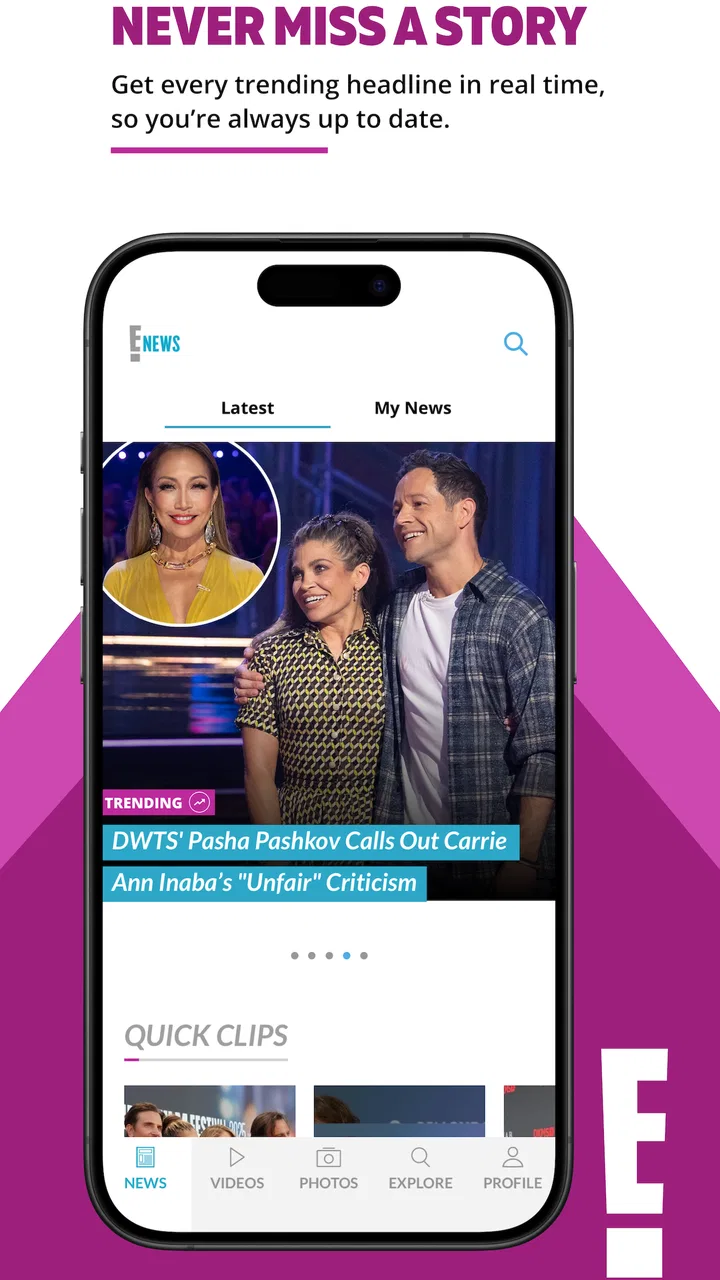
I installed E! News expecting a quick way to follow entertainment headlines, and that is exactly where it makes the most sense. This free News & Magazines app from Versant Media, LLC is built for people who want celebrity news, television updates, red-carpet coverage, and pop-culture stories in a format that is easier to check than a full news website. I found it most useful in short visits: opening it during a coffee break, scanning the latest stories, and saving my attention for the items that genuinely interest me.
The app has a 4.3 average from around 17 thousand ratings, with more than a million installs, so it is clearly not a niche experiment. Its Teen content rating also gives a useful expectation: this is entertainment journalism aimed at older children and adults, not a private gossip diary or a general-purpose breaking-news replacement. The current version is 7.3.0, and it runs on Android 8.0 or later. Those details matter if you are using an older phone or deciding whether this should become your everyday source for pop culture.
How E! News fits into a real daily routine
My baseline workflow was simple. I opened the app when I wanted a quick overview rather than a long reading session, looked through the newest headlines, and chose individual articles according to my interests. That makes the app feel closer to a compact entertainment briefing than to a traditional newspaper. It is not trying to make every visit deep or analytical; its strength is helping me catch up without searching several separate websites.
You May Also Like

 Blood Strike: 2.5 Anniversary
Blood Strike’s Loadouts Turn Every Drop Into a Tactical Gamble
A close look at Blood Strike’s custom loadouts: how fast access to signature weapons reshapes its battle royale rhythm, rewards preparation, and narrows the gap between fights.

 Pandora - Music & Podcasts
Pandora’s Music Is Easy to Start, but Harder to Recover
Pandora’s strength is its low-effort path from a seed to a station. Its weak spot is how much confidence it asks you to place in connection, setup, and quiet recovery.

 8 Ball Pool
 Is Built on Rivalries, Rematches, and Routine
A close look at the rivalries, rematches, shared routines, and unanswered safety questions that turn a quick pool match into a persistent mobile community.

 Samsung Music
’s Quiet Strength Is Playing What You Already Own
Its reach comes less from spectacle than from dependable access to a personal library. That simplicity is both the app’s strongest retention engine and its ceiling.

 AccuWeather: Weather Radar
AccuWeather Review: A Quick, Clear Forecast for Everyday Decisions
For everyday plans, the best forecast is the one you can understand quickly. AccuWeather makes rain timing, radar, and local conditions easy to act on, with a few trade-offs.

 Hill Climb Racing
Why Hill Climb Racing Still Turns Crashes Into One More Run
A tiny car, a bumpy hill and one more upgrade: Hill Climb Racing keeps resurfacing because its simple chaos makes every near-miss feel personal.
More From Our News Desk
View All News


A realistic use case is a television fan who wants to know what is happening around a series, actor, or reality-show cast while commuting or waiting for an appointment. Instead of opening a browser, searching a name, and sorting through unrelated results, that reader can use the app as a focused starting point. I also found it handy after watching a major televised event, when I wanted surrounding celebrity coverage and follow-up stories rather than a technical news report.
The reading experience works best when I treat it as a stream of possibilities. Some headlines are immediately relevant, while others are easy to skip. That sounds obvious, but it changes how enjoyable the app feels. If I expect every item to deserve a full read, the mixed entertainment feed can feel noisy. If I use it to identify the few stories worth my time, the same feed becomes efficient.
One practical habit is to separate “check now” from “read later.” I scan headlines first and open only the articles that answer a question I already have or introduce a topic I genuinely follow. This prevents a short visit from turning into an endless loop of similar celebrity updates. It also makes the app more useful for people who want entertainment news without allowing it to take over their whole day.
Compared with a browser search, E! News removes some of the work involved in finding a starting point. Compared with a broad news aggregator, it offers a narrower editorial focus. Compared with social media, it is less dependent on a rapidly changing stream of reactions and reposts. The trade-off is that it cannot replace a general news app, a specialist television guide, or a primary source for serious reporting.
What I would check before making it a habit
Because the app is free, the main question is not whether it is worth paying for but whether its entertainment-first focus matches your routine. I would install it if I regularly follow celebrity stories, television personalities, award-season coverage, or pop-culture conversations. I would skip it if I mainly want world news, local reporting, business updates, sports scores, or a carefully organized reading list across many subjects.
The Teen rating is another useful boundary. It signals that the app is not designed as a young child’s news reader, and parents should make their own decision about whether the subject matter and presentation suit a particular teenager. For an adult reader, the rating is less important than recognizing the editorial tone: this is entertainment coverage, where personalities and public events are central to the experience.
Device compatibility is straightforward for most current Android users because the minimum requirement is Android 8.0. On an older device, I would check the operating system before planning around it. The app’s free price makes trying it low-risk, but a free download does not automatically make it the best fit. The real value comes from whether the available coverage overlaps with what you already search for.
Settings and habits that make the feed easier to manage
I recommend spending a little time observing how the app presents stories before changing your routine. Rather than tapping every headline, notice which subjects repeatedly catch your attention. This creates a personal filter even when the app itself is serving a broad entertainment mix. For example, I might decide that television news gets priority, while celebrity speculation is something I open only when the headline provides clear context.
Notification controls are worth checking on any news app, especially one covering fast-moving entertainment stories. If alerts are available on your installation, I would keep only the ones that support a real need and silence anything that interrupts too often. The point is not to receive every update. A quieter setup makes the app something I consult deliberately, instead of a source of constant prompts.
I would also review the app’s general Android notification permission and system-level battery behavior if updates seem distracting or delayed. These are not special E! News tricks; they are sensible checks that affect how any mobile news reader behaves. The useful insight is that the app should serve a repeatable reading window. If notifications dictate the schedule, the convenience of a compact entertainment feed can disappear.
Reading preferences are equally important. I prefer opening a story only when I can give it enough attention, rather than repeatedly switching between headlines and other tasks. If an article is longer than expected, I finish it later through the same app instead of trying to reconstruct the story from social posts. That small habit reduces the chance of forming an opinion from a headline alone.
There is also a privacy-minded reason to keep the workflow simple. I do not grant an app more access than its core job requires, and I avoid treating a news reader as a personal archive unless it clearly supports that use. E! News is most comfortable as a discovery and reading tool. I would not depend on it as my only method for keeping permanent records of articles, names, or dates.
Faster ways to get useful information
The fastest pattern I found is a two-pass scan. On the first pass, I read only the headline and the most obvious context. On the second, I open the few items that connect to a person, show, or event I already care about. This is more efficient than reading from top to bottom, and it keeps the app useful during a short break.
A second pattern is to use the app after, rather than before, a major entertainment event. When I already know the basic event, the coverage becomes easier to evaluate: I can look for reactions, follow-up details, and related stories instead of trying to understand everything from isolated headlines. This approach also reduces the temptation to open every article simply because it is new.
For readers who follow several recurring subjects, I would create a mental rotation. One visit can focus on television, another on celebrity interviews, and another on broader entertainment headlines. The app does not need to become a checklist. Rotating attention prevents the feed from feeling repetitive and gives each short session a clear purpose.
Another useful trade-off is speed versus context. Headlines let me catch up quickly, but entertainment stories can be easy to misunderstand when reduced to a few words. When a subject matters to me, I open the full article and read beyond the first paragraph. When it does not, I move on. That distinction is one of the simplest ways to avoid both information overload and shallow reading.
I would not use social media as the only alternative for this kind of coverage. Social platforms can be faster for reactions, but they also mix commentary, rumors, promotional posts, and personal opinions. E! News gives me a more deliberate place to start. On the other hand, if I need immediate confirmation of a developing event, I would compare the story with a more direct or specialized source rather than assuming an entertainment app is sufficient for every detail.
Where the app reaches its limits
The biggest limitation is scope. E! News is not a balanced daily news service, and installing it will not simplify your entire information diet. It is strongest when entertainment is the destination. If you want one app covering politics, science, finance, local events, and international reporting, a general news aggregator is the better choice.
The second limitation is that a broad entertainment feed will naturally include stories I do not care about. I cannot expect every headline to match my interests, so the app rewards active skipping. Readers who want a highly customized, topic-by-topic dashboard may prefer an aggregator with more explicit source and subject controls.
There is also a difference between reading coverage and verifying information. For casual updates about public figures or television culture, the app can be a convenient first stop. For claims that affect work, health, money, or reputation, I would look for additional reporting and primary material. Entertainment coverage can be useful without being the final authority on every subject it touches.
People who dislike celebrity-focused content should probably avoid downloading it simply because it is popular. The app’s audience size and rating suggest that many readers find it valuable, but those figures do not change the basic editorial focus. Popularity is not a substitute for relevance. If your interests lie elsewhere, another category of news app will feel more productive from the first launch.
I also think it is important not to confuse convenience with depth. The app makes discovery easy, but depth depends on the individual article and on how much context the reader needs. I use it to decide what deserves attention, then adjust my source choice when the subject becomes more serious or specialized. That is a healthier role for it than expecting one entertainment app to answer every question.
Who should install it, and who should pass?
I would recommend E! News to a reader who checks entertainment headlines several times a week, follows television and celebrity culture, and prefers a dedicated app to browser tabs. It is especially suitable for short reading sessions, casual catch-up, and discovering stories connected to familiar public figures or shows.
I would also recommend it to someone who wants a clear separation between general news and lighter entertainment reading. Keeping those purposes in different apps can make both easier to use. I can open this one when I want pop-culture updates without mixing them into a work-focused news routine.
I would not recommend it as the only news app for a household, student, or professional who needs broad coverage. It is also a poor fit for anyone who wants a quiet, highly technical reading environment with no interest in celebrity or television news. In those situations, a general newspaper app, specialist publication, or customizable aggregator will offer better coverage.
The app is free, which makes experimentation easy, but I still suggest giving it a defined trial routine rather than leaving it installed by default. Use it during a few planned reading sessions and ask whether it helps you find stories you actually wanted. If you repeatedly leave feeling distracted or under-informed, the problem is probably not the interface; the category itself may not match your needs.
My verdict after using it regularly
The best way to use E! News is as a focused entertainment briefing, not as a replacement for all other news. Once I accepted that boundary, the app became more useful. I could scan quickly, open the stories that mattered, and stop without feeling that I had missed an entire newspaper.
Versant Media, LLC has a product that suits casual and committed pop-culture readers alike, provided they are comfortable choosing what to read from a broad stream. Its free availability, Teen rating, current Android support, and established audience make it easy to try. The 4.3 average from around 17 thousand ratings is encouraging, while the more than a million installs show that the format has found a substantial audience.
My final recommendation is conditional but positive: install it if entertainment news is already part of your day and you want a dedicated place to catch up. Build a routine around short scans, selective reading, and restrained notifications. E! News works best when I use it intentionally—quickly enough for convenience, but carefully enough to read beyond a headline when the story deserves it.
FAQs for E! News
01What is E! News, and what type of content does the app offer?
E! News is an entertainment and celebrity news app focused on pop culture, television, movies, music, fashion, red-carpet events, and celebrity lifestyles. After exploring the app, users can expect a steady stream of articles, photo galleries, videos, interviews, and updates about trending entertainment stories. The content is designed for readers who want quick access to celebrity news and entertainment coverage in one place.
02Is the E! News app free to download and use?
The E! News app is generally free to download and provides access to a selection of entertainment articles, videos, images, and breaking-news updates without requiring an upfront purchase. However, availability can vary by country, device, and publisher policy. Some video content may also depend on regional licensing or television-provider access, so users should review the current app-store listing before downloading.
03Does E! News require a cable or streaming subscription?
A subscription is not normally required to browse the main news feed, read many articles, and view publicly available entertainment content. Nevertheless, certain videos, full episodes, or premium clips may be restricted by location or require authentication through a participating television or streaming provider. The exact access rules can change, so it is worth checking the sign-in prompts and content descriptions inside the app.
04Can I receive notifications for breaking celebrity and entertainment news?
Yes, E! News can provide notifications for important entertainment stories, celebrity updates, major events, and other trending topics, depending on the version of the app and your device settings. Notifications can usually be enabled or disabled through the app or the phone’s system settings. If you prefer fewer interruptions, adjusting notification categories is recommended because frequent updates may be sent during busy news cycles.
05Is E! News suitable for children and younger users?
E! News is primarily aimed at teens and adults interested in celebrity culture and entertainment journalism. Although much of the content is general-interest news, some articles may discuss relationships, scandals, mature television programs, fashion, or sensitive celebrity situations. Parents should review the platform’s age rating and consider device-level parental controls, especially if younger children will use the app without supervision.
Pros
- Covers celebrity news
- entertainment
- TV
- and red-carpet events in one place.
- Offers timely updates for readers who follow breaking pop-culture stories.
- Includes photo galleries and videos that add visual context to major stories.
- Personalized alerts help users keep up with selected entertainment topics.
- Clean layout makes browsing headlines and featured stories straightforward.
Cons
- Some articles may focus heavily on celebrity rumors or sensational headlines.
- Frequent notifications can feel excessive unless alert settings are adjusted.
- Video and image-heavy content may use considerable mobile data.
- Certain stories or features may require a cable or streaming provider login.
- Coverage can feel U.S.-centric for users seeking broader international entertainment news.

E! News
Gallery